
Supercharge Your Support TeamWith Powerful Zendesk Apps
Two essential Zendesk apps designed to boost agent productivity. Preview documents instantly and view tickets side by side—all without leaving your workflow.

Our Zendesk Apps
Powerful productivity tools designed for support teams

Sharely
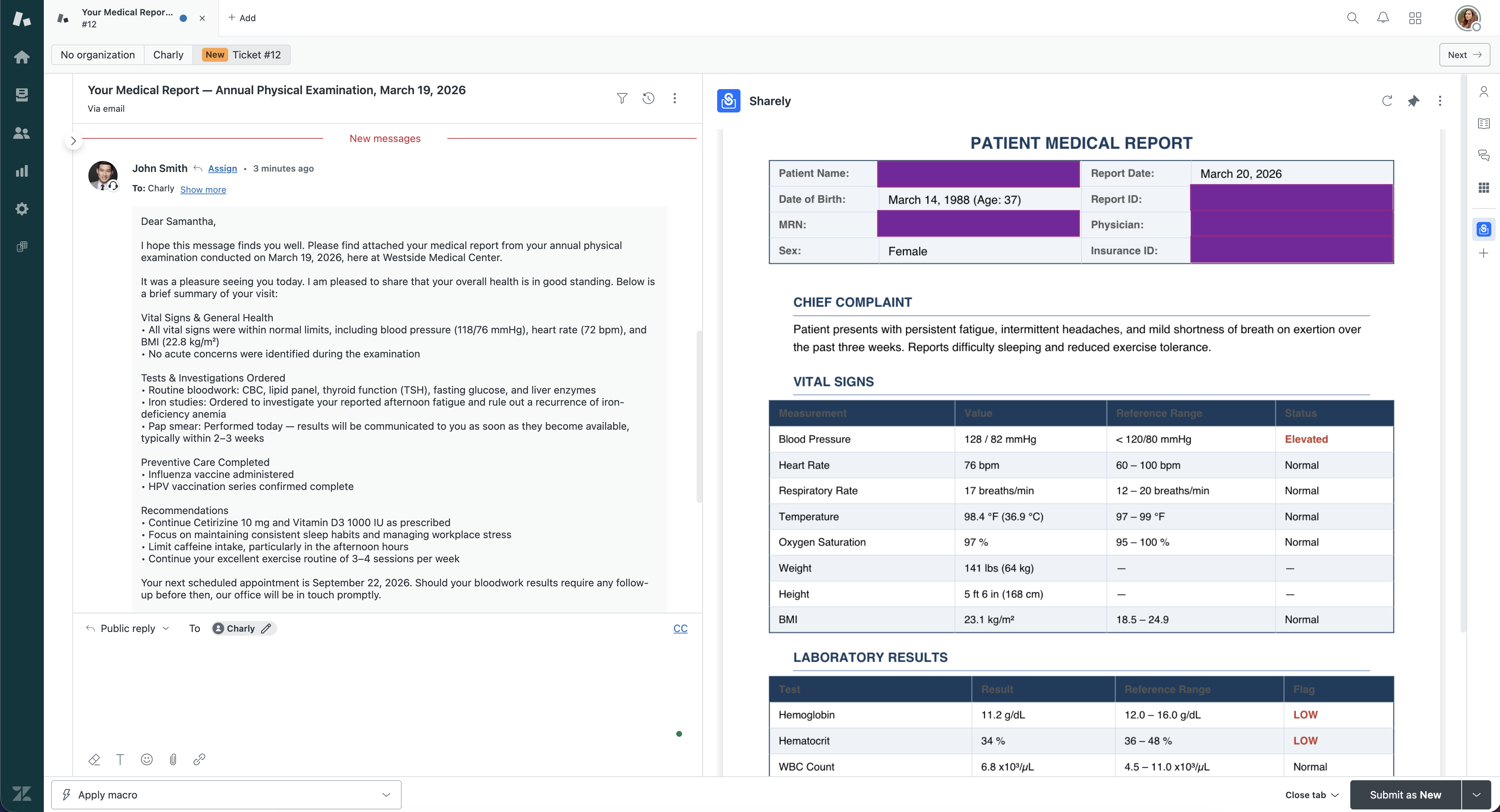
Transform how support agents handle ticket attachments. Preview documents directly within the ticket sidebar—no downloads needed. Supports PDF, Word, Excel, CSV, and image formats with powerful zoom, search, and navigation features.
View attachments without downloading—stay in your workflow
PDF, Word (.docx), Excel (.xlsx/.xls), CSV, and all image types
Zoom, page navigation, search, and fullscreen viewing
Works immediately after installation—no configuration needed

SideTicket
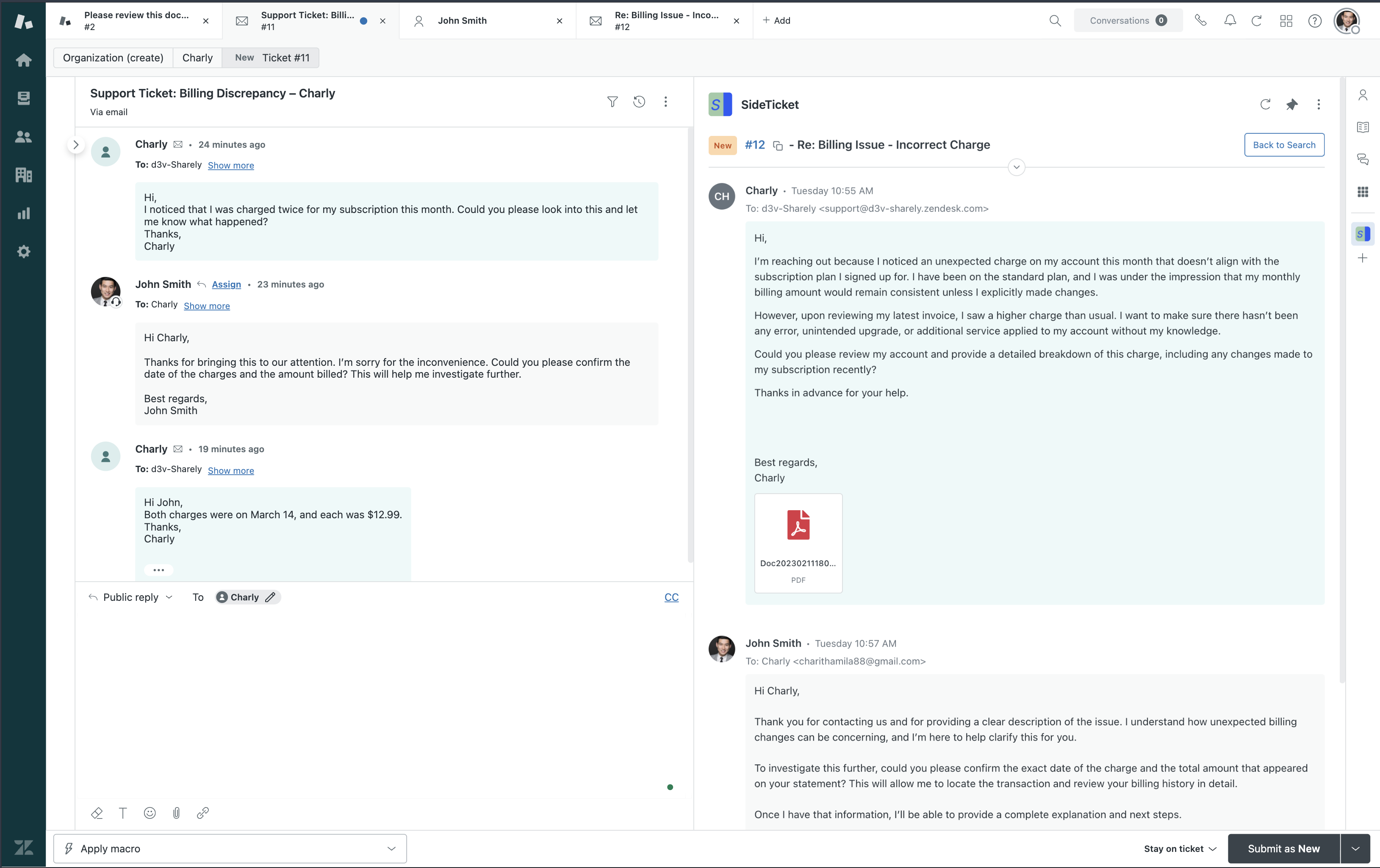
Eliminate tab-switching when referencing related tickets. View any ticket side by side in the sidebar while working on the main ticket. Perfect for handling escalations, duplicates, or complex multi-ticket issues.
Work on two tickets simultaneously without switching tabs
Find tickets by ID, subject, or comment content instantly
Read complete ticket history including internal notes
Navigate faster with intuitive keyboard controls
Supported File Types
Sharely handles all common document and image formats
PDF Documents
Full support with page navigation, zoom, and search capabilities
Word Documents
View formatted documents with styles, tables, and images preserved
Spreadsheets
Browse sheets, search data, and view cell formulas and formatting
CSV Files
View data exports in organized tables with search and filtering
Images
Display screenshots, diagrams, and photos with zoom controls
More Coming
We're constantly adding support for more file formats based on user feedback
Trusted by Support Teams Worldwide
Join companies already using Sharely to boost productivity
Measurable Impact
Time saved translates to better customer support
Perfect For These Scenarios
Real-world situations where our apps save time and boost productivity
Sharely Use Cases
- 01
Quick Document Triage
Instantly check if an invoice, contract, or report is relevant before downloading
- 02
Data Verification
Review spreadsheet data or CSV exports right in the sidebar to verify customer information
- 03
Visual Issue Confirmation
View screenshots and error images without leaving Zendesk to understand the problem
- 04
Compliance Review
Check signed agreements and policy documents quickly during ticket resolution
SideTicket Use Cases
- 01
Duplicate Detection
Compare similar tickets side by side to identify and merge duplicates efficiently
- 02
Escalation Context
Reference the original ticket while working on an escalated or follow-up ticket
- 03
Customer History
View previous tickets from the same customer to understand their issue history
- 04
Cross-Reference Issues
Look up related tickets or linked issues without losing your place in the current ticket
Why Choose Sharely Platform?
Fast & Efficient
Preview documents instantly without downloading or opening external apps
Secure
All documents are processed securely within your Zendesk environment
Easy Setup
Install from Zendesk Marketplace and start using immediately
Better Support
Faster response times with instant document access. Reduced context switching means more tickets resolved per hour.
Boost Productivity
Save valuable minutes on every ticket by previewing attachments instantly. No more downloading files just to check if they're relevant—keep your agents focused and efficient.
Eliminate Downloads
Prevent unnecessary file downloads that clutter devices and consume bandwidth. Preview everything in-sidebar and only download what you actually need.
Frequently Asked Questions
Common questions about Zendesk productivity apps
How do I view Excel files in Zendesk without downloading?
What is the best app for side-by-side ticket viewing in Zendesk?
Can I preview PDF documents directly in the Zendesk sidebar?
How much time does a document preview app save for Zendesk agents?
Are Zendesk attachment previews secure?
Transform your support team's workflow
Empower your agents with powerful productivity tools. Preview documents instantly, view tickets side by side, and keep your team focused on what matters—delivering exceptional customer support.